
The printed sheet
How the Value-First Team sets up its own HubSpot portal, for HubSpot users.
Every note holds one piece of written context, kept on each record it is about.
Our notes can also say what kind they are, such as a brief before a meeting or a record of a change, and who they are for.
Why notes in HubSpot?
“… your meeting notes … share that … with HubSpot because that’s valuable context …”
Jeff Vincent, Let’s Unbox A HubSpot Customer Data Model with Jeff Vincent, 27 June 2025
Try it in your portal
- Link every record. Add each person, Account, Opportunity or ticket the note concerns, so it shows on every timeline. On a saved note: Activities tab › associations link. All products and plans.
- Note each correction. When you correct something that matters, leave a note on the record saying who made the change and what changed. Note icon › Save note. All products and plans.
- Write a new note, not an edit. When you redo a summary, add a new note instead of rewriting the old one, so the earlier version stays on the timeline. Note icon › Save note. All products and plans.
What do we keep about a Note?
Beyond HubSpot’s usual text, date and owner, we keep:
- What kind it is. A brief before a meeting, a synthesis after it, an observation, a record of a change and a few more.
- Where a meeting stood. For a meeting note, whether it was written when the meeting was prepared, synthesized, canceled or rescheduled.
- Who it is for. Our team only, us and a delivery partner, or shared with the client.
- Which AI member wrote it. When an AI member of our team wrote the note into HubSpot, which one.
Whose value does it serve?
Value for the Customer
Notes serve the people and organizations we work with. What we learn with them stays on their record, so the next conversation starts from it instead of from scratch.
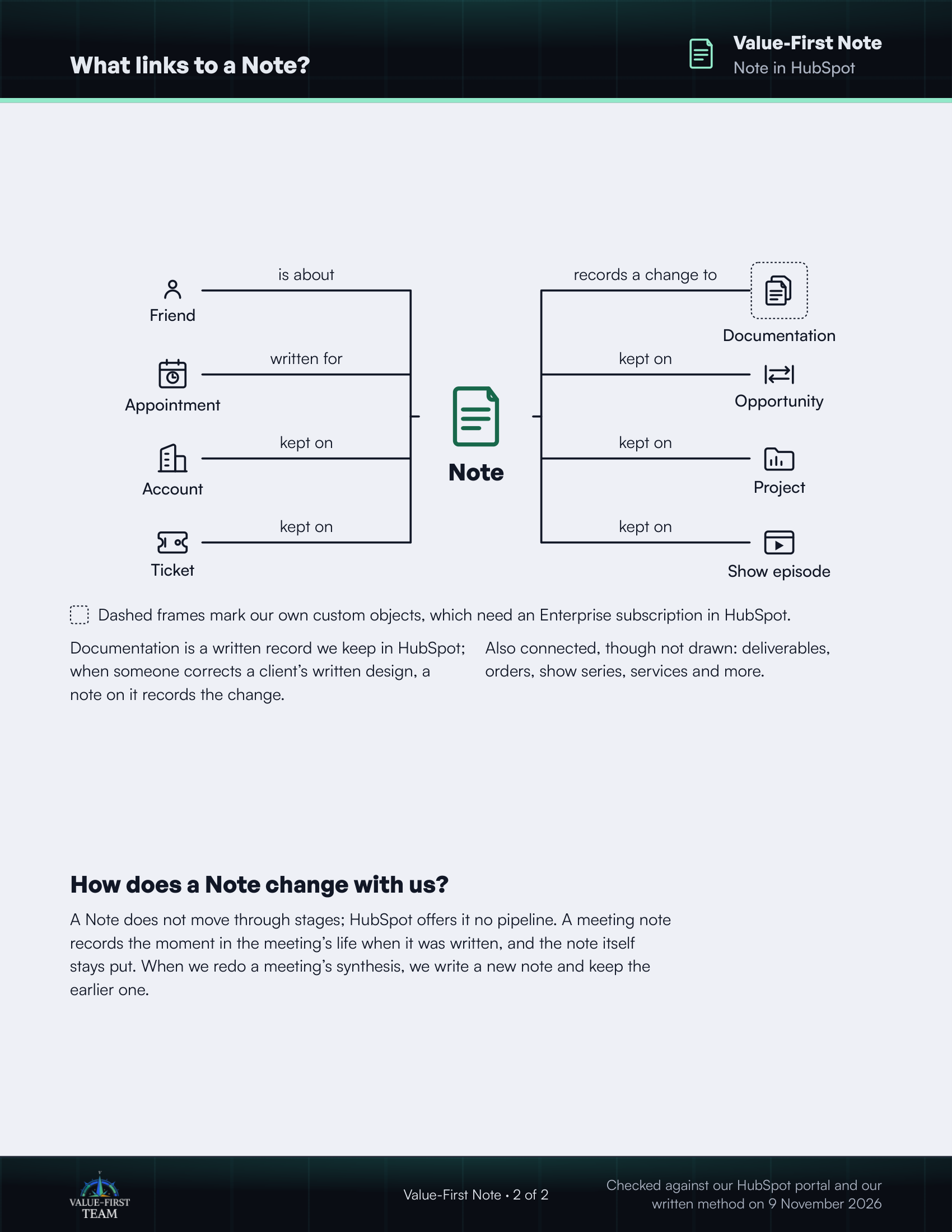
What links to a Note?
- is about Friend
- written for Appointment
- kept on Account
- kept on Ticket
- records a change to Documentation (custom object)
- kept on Opportunity
- kept on Project
- kept on Show episode
Dashed frames mark our own custom objects, which need an Enterprise subscription in HubSpot.
On the printed sheet these objects are drawn with dashed frames; this list gives the same links without the frames.
Documentation is a written record we keep in HubSpot; when someone corrects a client’s written design, a note on it records the change.
Also connected, though not drawn: deliverables, orders, show series, services and more.
How does a Note change with us?
A Note does not move through stages; HubSpot offers it no pipeline. A meeting note records the moment in the meeting’s life when it was written, and the note itself stays put. When we redo a meeting’s synthesis, we write a new note and keep the earlier one.
Checked against our HubSpot portal and our written method on 9 November 2026