
Value-First Documentation
Our own custom object in HubSpot
The printed sheet
How the Value-First Team sets up its own HubSpot portal, for HubSpot users.
Each Documentation record is one written record we keep in HubSpot, linked to what it is about.
HubSpot ships no object like it, so we made this one: written procedures, records of checking them, onboarding records for our AI team and software tool profiles.
Why keep it in HubSpot?
“… data model documentation in here … mix the narrative and story of what objects are doing …”
Chris Carolan, Another Orange Morning, 17 July 2026
Try it in your portal
- Record who checked it. Label the link to the contact who checked a record, such as “Checked by”. Data Model › Edit Data Model › Create association label. Professional or Enterprise; Enterprise for custom objects.
- One pipeline per kind. Make one pipeline for each kind of record, as we do for corrections and audits. Settings › Data Management › Objects › your object › Pipelines tab. Enterprise for a custom object.
- Keep the version it replaces. Create a pair of labels, “Replaces” and “Replaced by”, for links between two records of the same object. Data Model › Edit Data Model › Create association label. Professional or Enterprise; Enterprise for custom objects.
What do we keep about Documentation?
Beyond the usual record details and HubSpot history, we keep:
- The written text. The text of the record and its version.
- When it was last checked. The date of the last check and the evidence the check cited.
- Practice or finding. Whether it is a standing practice we keep current or a dated finding.
- Who may see it. Whether it is internal only, cleared for outside use or awaiting redaction.
Whose value does it serve?
Value in Context
Value in Context is for the decision, and whoever has to make it. The record keeps the written layer of context in HubSpot, linked to the Friends, projects and accounts it concerns.
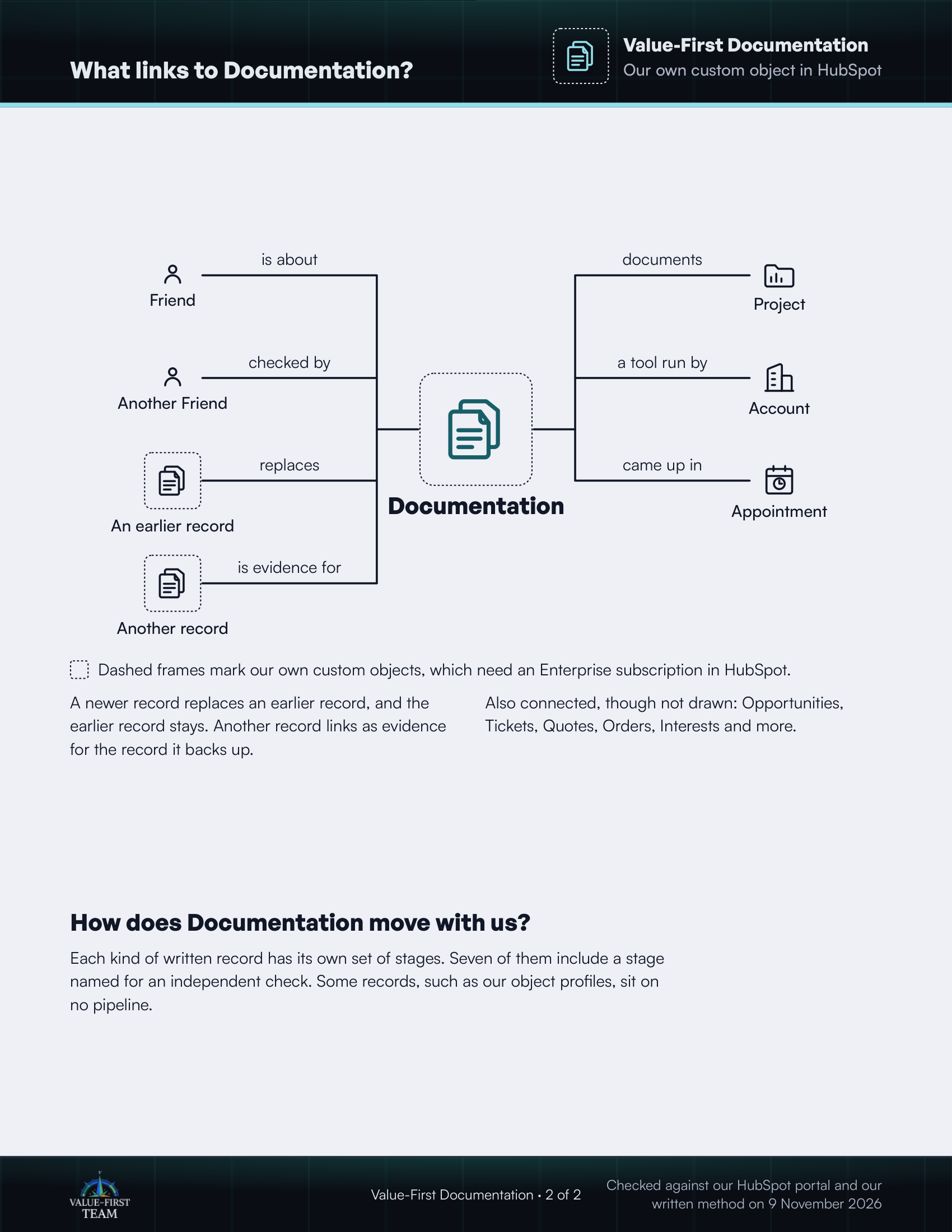
What links to Documentation?
- is about Friend
- checked by Another Friend
- replaces An earlier record (custom object)
- is evidence for Another record (custom object)
- documents Project
- a tool run by Account
- came up in Appointment
Dashed frames mark our own custom objects, which need an Enterprise subscription in HubSpot.
On the printed sheet these objects are drawn with dashed frames; this list gives the same links without the frames.
A newer record replaces an earlier record, and the earlier record stays. Another record links as evidence for the record it backs up.
Also connected, though not drawn: Opportunities, Tickets, Quotes, Orders, Interests and more.
How does Documentation move with us?
Each kind of written record has its own set of stages. Seven of them include a stage named for an independent check. Some records, such as our object profiles, sit on no pipeline.
Checked against our HubSpot portal and our written method on 9 November 2026