
The printed sheet
How the Value-First Team sets up its own HubSpot portal, for HubSpot users.
Each Meeting record is one calendar meeting: when it happens, what it is called, where, and who is invited.
Most come from a connected calendar, and nearly all link to the Friend records of those invited. The team’s work goes on an Appointment beside it.
Why an Appointment?
“… using appointments in HubSpot … more granularly associate and manage meetings activity.”
Chris Carolan, Another Orange Morning, 22 October 2026
Try it in your portal
- Let your calendar write them. Connect your Google or Office 365 calendar and leave Calendar Sync on, so a meeting with a contact lands on their record. Settings › General › Calendar tab. All plans.
- Work on an Appointment. Turn on the Appointments object and keep preparation and follow-up there, leaving the meeting as the calendar wrote it. Data Management › Data Model › Manage tab › Activate object. Super Admin only.
- Share a booking link. Create a scheduling page so people book time on your calendar and the meeting arrives on its own. Sales › Meetings Scheduler › Create scheduling page. All plans.
Whose value does it serve?
Value for the Customer
That means the people and organizations we work with. The meetings our calendars hold with them sit on their records, so anyone serving them sees when they last met and what is booked next.
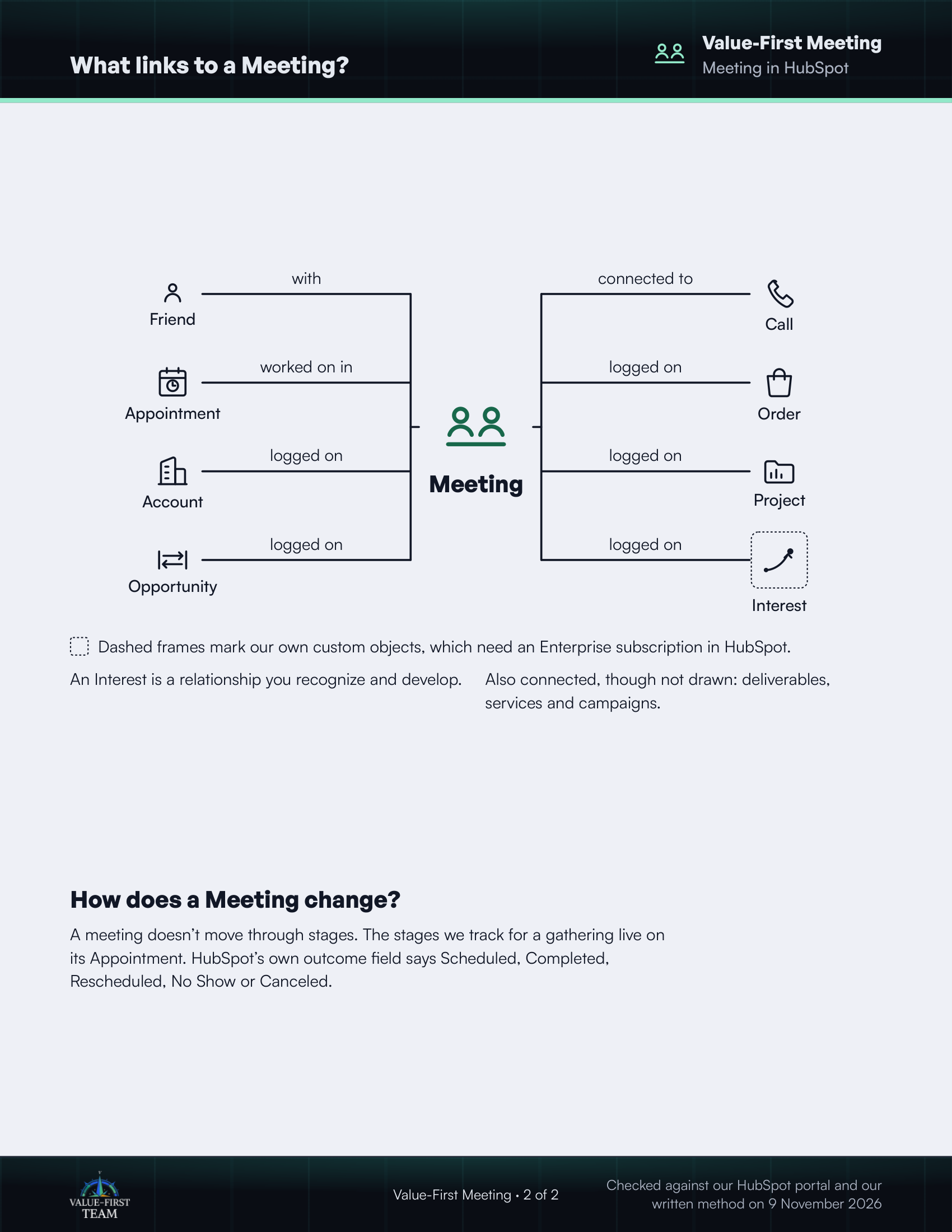
What links to a Meeting?
- with Friend
- worked on in Appointment
- logged on Account
- logged on Opportunity
- connected to Call
- logged on Order
- logged on Project
- logged on Interest (custom object)
Dashed frames mark our own custom objects, which need an Enterprise subscription in HubSpot.
On the printed sheet these objects are drawn with dashed frames; this list gives the same links without the frames.
An Interest is a relationship you recognize and develop.
Also connected, though not drawn: deliverables, services and campaigns.
How does a Meeting change?
A meeting doesn’t move through stages. The stages we track for a gathering live on its Appointment. HubSpot’s own outcome field says Scheduled, Completed, Rescheduled, No Show or Canceled.
Checked against our HubSpot portal and our written method on 9 November 2026