
The printed sheet
How the Value-First Team sets up its own HubSpot portal, for HubSpot users.
Each Quote record holds one written offer: what we propose, at what price and on what terms.
It is made for an Opportunity, sent to the buyer’s people and offered to the buyer’s company, with the priced lines listed.
Why build from records?
“It becomes easiest when you really use the rest of HubSpot.”
Chris Carolan, Let’s Unbox HubSpot: AI-Powered CPQ, 21 October 2025
Try it in your portal
- Start from the Opportunity. Create each quote from its Opportunity, so the buyer’s contact and Account and its line items come with it. CRM › Deals › the Opportunity › Quotes card › + Add. Revenue Hub Professional or Enterprise, with a Revenue Hub seat.
- Ask for a countersignature. Set the quote to e-signature, tick the buyers who must sign, then pick a countersigner from your own team. Quote editor › acceptance module › E-signature › Countersigners. Revenue Hub Professional or Enterprise.
- Mark teaching examples. Add a dropdown property for real offers and examples (ours is Record Basis: Lived or Illustrative), then filter by it. Quotes › Actions › Edit properties › Create property, Dropdown select. Revenue Hub Professional or Enterprise.
What do we keep about a Quote?
Beyond HubSpot’s usual quote details, we keep:
- Real offer or example. Whether it is a real offer between real parties or a teaching example, which can never count as value.
Whose value does it serve?
Value for the Company
That means our own organization, the one doing the work. Each Quote is a promise offered, and it gives the buyer’s stakeholders something concrete to review, approve and reference.
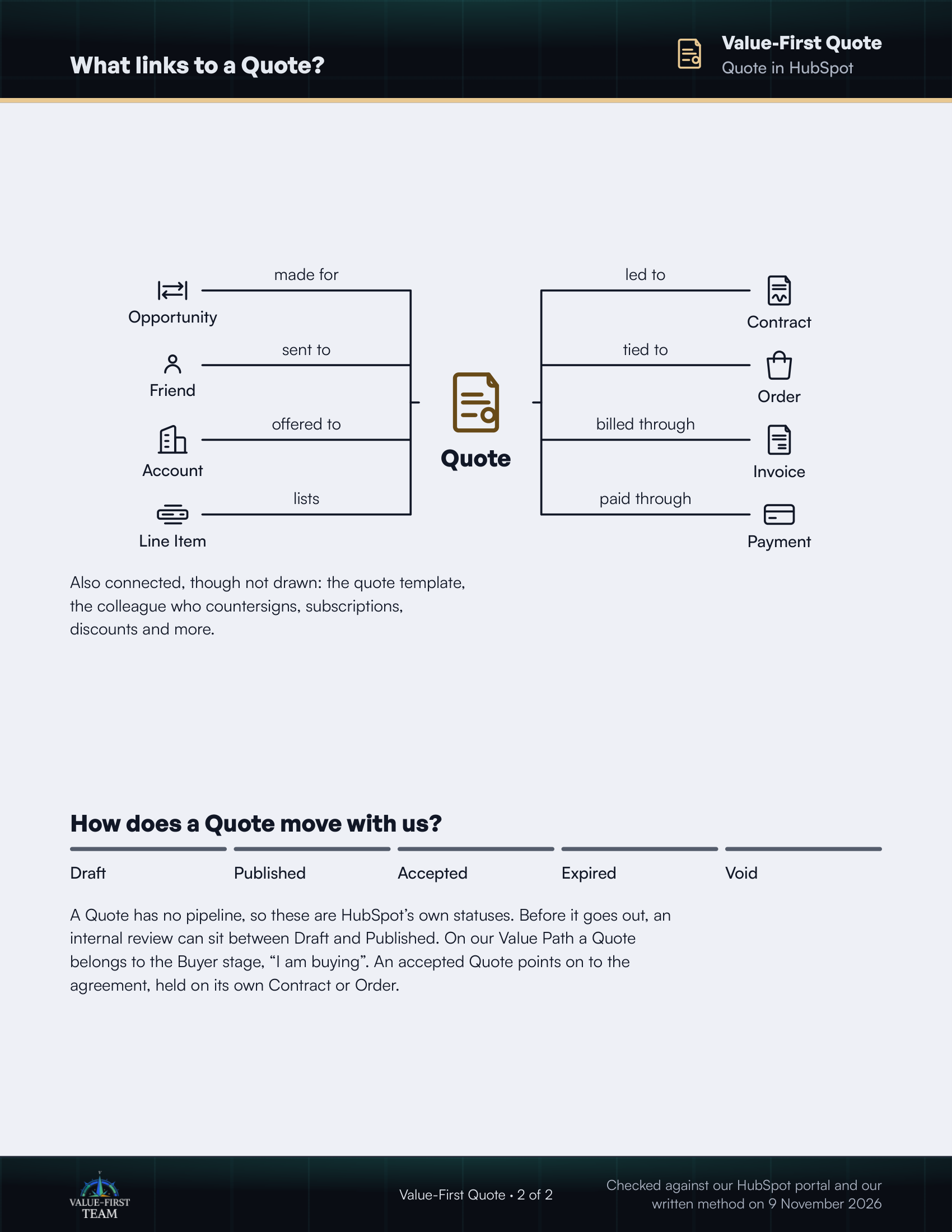
What links to a Quote?
- made for Opportunity
- sent to Friend
- offered to Account
- lists Line Item
- led to Contract
- tied to Order
- billed through Invoice
- paid through Payment
Also connected, though not drawn: the quote template, the colleague who countersigns, subscriptions, discounts and more.
How does a Quote move with us?
- Draft
- Published
- Accepted
- Expired
- Void
A Quote has no pipeline, so these are HubSpot’s own statuses. Before it goes out, an internal review can sit between Draft and Published. On our Value Path a Quote belongs to the Buyer stage, “I am buying”. An accepted Quote points on to the agreement, held on its own Contract or Order.
Checked against our HubSpot portal and our written method on 9 November 2026