
Value-First Contract
HubSpot’s own Contract object
The printed sheet
How the Value-First Team sets up its own HubSpot portal, for HubSpot users.
One Contract holds one agreement with a customer: what was agreed, for how long, and how it is billed.
We use Contracts as HubSpot ships them, with no field of our own. A record names both sides: the customer’s company and people, and the seller’s details.
Why use Contracts?
“If you have any kind of post-sales revenue goals … you will get value out of using contracts.”
Chris Carolan, Unboxing HubSpot Revenue Hub: Contracts, 3 September 2026
Try it in your portal
- Let a quote make the Contract. Switch on “Create contract records from accepted quotes”. With your billing setting on, the first invoice goes out at once. Settings › Data Management › Objects › Contracts. Revenue Hub Professional or Enterprise; Super Admin.
- Keep a Contract without billing. Switch Billing off when you create it, and it holds the agreement while you bill another way. Revenue › Contracts › Add contracts › Create new. Any plan; a beta a Super Admin turns on first.
Whose value does it serve?
Value for the Company
That means our own organization. A Contract holds one agreement’s commitments on one record, beside what has been billed and paid against them.
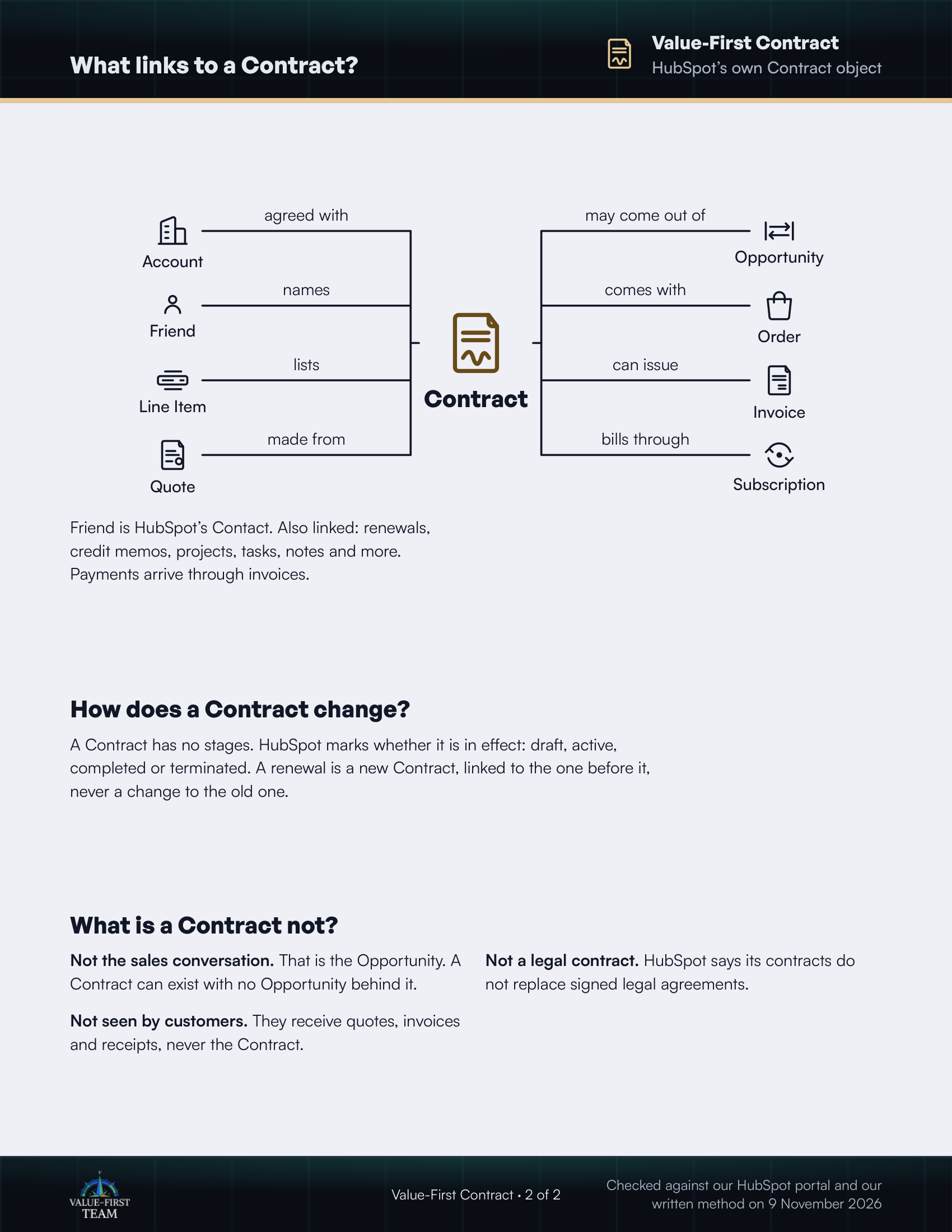
What links to a Contract?
- agreed with Account
- names Friend
- lists Line Item
- made from Quote
- may come out of Opportunity
- comes with Order
- can issue Invoice
- bills through Subscription
Friend is HubSpot’s Contact. Also linked: renewals, credit memos, projects, tasks, notes and more. Payments arrive through invoices.
How does a Contract change?
A Contract has no stages. HubSpot marks whether it is in effect: draft, active, completed or terminated. A renewal is a new Contract, linked to the one before it, never a change to the old one.
What is a Contract not?
- Not the sales conversation. That is the Opportunity. A Contract can exist with no Opportunity behind it.
- Not a legal contract. HubSpot says its contracts do not replace signed legal agreements.
- Not seen by customers. They receive quotes, invoices and receipts, never the Contract.
Checked against our HubSpot portal and our written method on 9 November 2026