
The printed sheet
How the Value-First Team sets up its own HubSpot portal, for HubSpot users.
A Payment record holds one amount of money that reached us, from a named person, at one moment.
In our portal, every Payment is connected to the person who paid, our Friend record (HubSpot’s Contact). It holds only the money; commitments live on their own record.
Why only the money?
“So the promise is often much more than the payment itself.”
Chris Carolan, Hubsessed Office Hours: Unified Revenue View, 1 October 2026
Try it in your portal
- Record outside money. Log a bank transfer or a charge from another processor as a Payment. Revenue › Payments › Add payments › Collect a payment › Or create a manual payment. All plans. Super Admin or Manage payments and subscriptions permission.
- Link payments to people. From a contact or subscription, open the preview. Payments card › + Add › tick the payments › Save. A person can have many payments; each payment has one person. All plans.
- Count what went through. HubSpot also keeps failed and refunded payments. Filter Revenue › Payments by Status: Succeeded. All plans; Super Admin or Manage payments or subscriptions permission.
What do we keep about a Payment?
Beyond HubSpot’s own amount, date, status and fees, we keep:
- Real or teaching example. Whether it is a real payment or an example made for teaching. An example never backs a claim about value.
- Who recorded it. When an AI member of our team writes a Payment, the record names the one that wrote it and the one that asked.
- Its phase in our Unified Revenue View. Settled once the payment went through; Closed if it was refunded or failed for good.
Whose value does it serve?
Value for the Company
It serves the organization doing the work. Our method reads money as the wake of value: “it is recorded after the value, and it is never the thing the view steers by.”
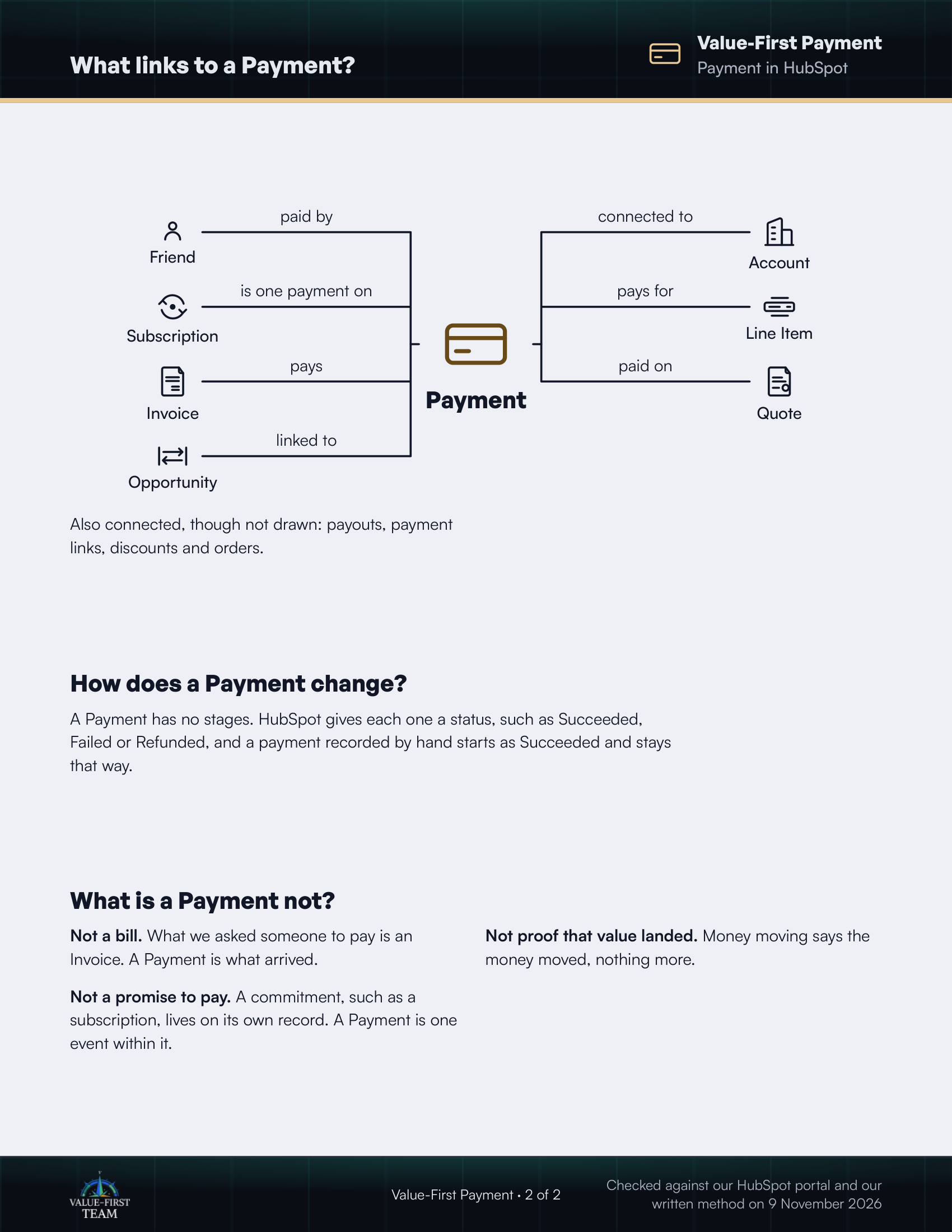
What links to a Payment?
- paid by Friend
- is one payment on Subscription
- pays Invoice
- linked to Opportunity
- connected to Account
- pays for Line Item
- paid on Quote
Also connected, though not drawn: payouts, payment links, discounts and orders.
How does a Payment change?
A Payment has no stages. HubSpot gives each one a status, such as Succeeded, Failed or Refunded, and a payment recorded by hand starts as Succeeded and stays that way.
What is a Payment not?
- Not a bill. What we asked someone to pay is an Invoice. A Payment is what arrived.
- Not proof that value landed. Money moving says the money moved, nothing more.
- Not a promise to pay. A commitment, such as a subscription, lives on its own record. A Payment is one event within it.
Checked against our HubSpot portal and our written method on 9 November 2026