
The printed sheet
How the Value-First Team sets up its own HubSpot portal, for HubSpot users.
A Service record holds one ongoing engagement: the recurring work we deliver, for as long as it continues.
That means a client’s ongoing partnership, or a member’s place in our membership. A bounded build goes on a Project; the agreement goes on an Order or a Contract.
Service or Project?
“… the hard part is understanding which object to use when.”
Chris Carolan, Another Orange Morning, 28 May 2026
Try it in your portal
- Split ongoing from bounded. Keep the ongoing engagement on a Service and each build with an end on its own Project. Activate both: Settings › Data Management › Data Model › Manage › Activate object (Super Admin). Then add each Project to its Service.
- Give each kind its own pipeline. Ours for ongoing partnerships runs from Service Activated to Value Activated Ongoing. Settings › Data Management › Objects › Services › Pipelines tab › Create pipeline. Needs a Starter, Professional or Enterprise subscription.
- Connect each session. Our sessions are Appointments, which a Super Admin activates. Add each to its Service with a “session” label. No Appointments card on the Service? Add it: Record Customization › Default view. Needs Professional or Enterprise.
What do we keep about a Service?
Beyond HubSpot’s usual service details, we keep:
- What it aims to achieve. The outcome the engagement aims for, how success is measured and the business result it connects to.
- The term. How many months it runs and how many sessions it includes.
- Where the work stands. The current phase and its theme, and what happens before the next session.
Whose value does it serve?
Value for the Customer · Value for the Community
For the people and organizations we work with, the record shows what they are receiving now. Delivery is visible to every team: who does the work, and who answers for the result.
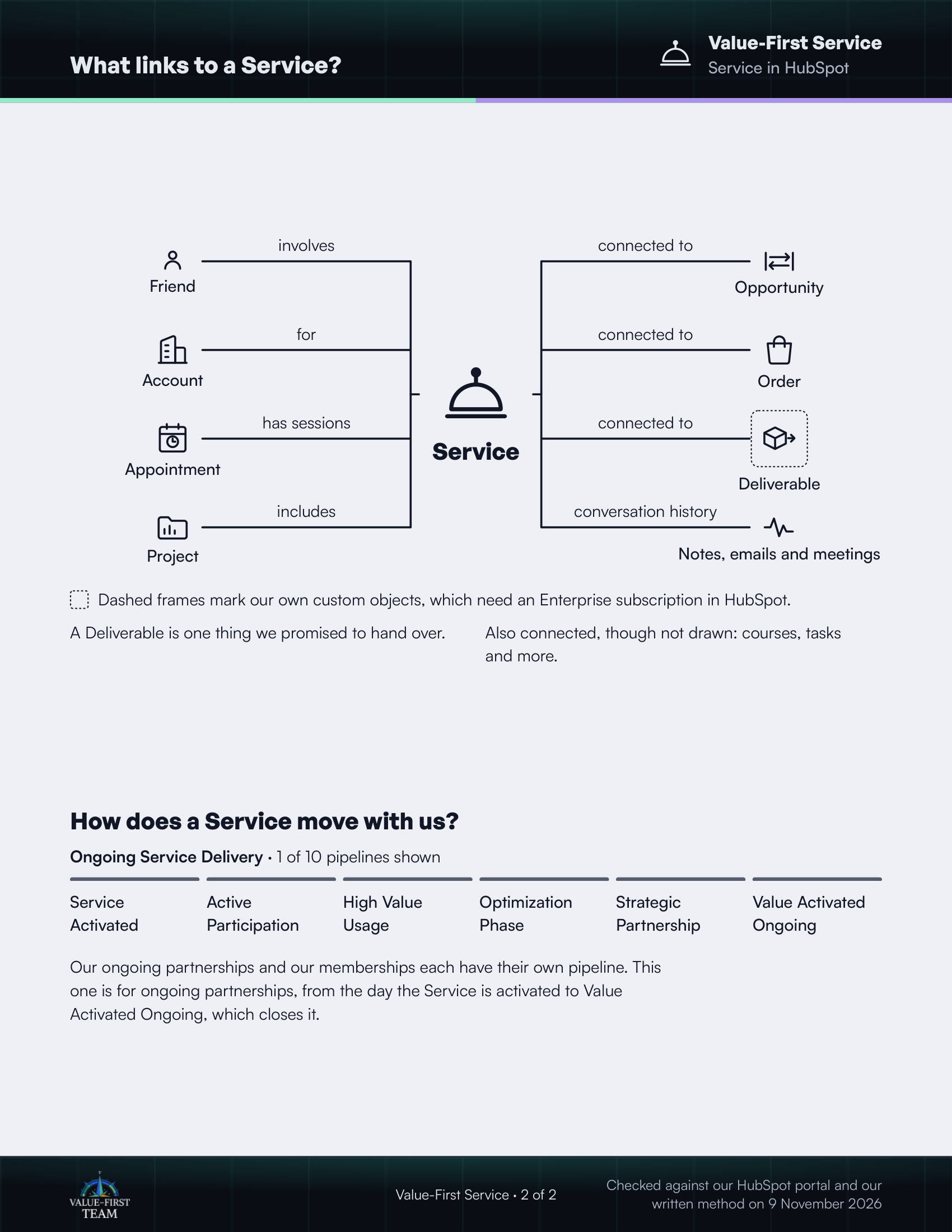
What links to a Service?
- involves Friend
- for Account
- has sessions Appointment
- includes Project
- connected to Opportunity
- connected to Order
- connected to Deliverable (custom object)
- conversation history Notes, emails and meetings
Dashed frames mark our own custom objects, which need an Enterprise subscription in HubSpot.
On the printed sheet these objects are drawn with dashed frames; this list gives the same links without the frames.
A Deliverable is one thing we promised to hand over.
Also connected, though not drawn: courses, tasks and more.
How does a Service move with us?
Ongoing Service Delivery · 1 of 10 pipelines shown
- Service Activated
- Active Participation
- High Value Usage
- Optimization Phase
- Strategic Partnership
- Value Activated Ongoing
Our ongoing partnerships and our memberships each have their own pipeline. This one is for ongoing partnerships, from the day the Service is activated to Value Activated Ongoing, which closes it.
Checked against our HubSpot portal and our written method on 9 November 2026