
Value-First HubSpot Update
Our own custom object, an Enterprise feature
The printed sheet
How the Value-First Team sets up its own HubSpot portal, for HubSpot users.
Each HubSpot product update we follow has one record, kept current whenever it comes back on our show.
It holds what HubSpot shipped, which hubs and plans it touches, what we think of it, and each episode that discussed it.
Why a custom object?
“…makes it easier to go bigger in terms of getting clips ready.”
Chris Carolan, Another Orange Morning, 22 July 2026
Try it in your portal
- Give each record one key. Key each record on a unique ID such as HubSpot’s rollout ID, in a text or number property that requires unique values, so one release stays one record. Settings › Properties › Create property › Edit more options › Rules tab. All plans.
- Label how deep a link goes. Label each episode link by depth, such as Mention or Deep Dive. Data Management › Data Model › Edit Data Model › Create association label. Super Admin only. Professional or Enterprise; Enterprise for custom objects.
- Use a dropdown for status. When HubSpot, not you, decides the status, as when it moves an update from beta to live, record it in a dropdown, not a pipeline. Settings › Properties › Create property, field type Dropdown select. All plans.
What do we keep about a HubSpot Update?
Beyond HubSpot’s own record fields, we keep:
- Hubs, plans and status. Which hubs and plans it touches, and where HubSpot’s rollout of it stands.
- What it is, why it matters. A description in plain words, and why the update matters to a reader.
- A signed take. Our point of view, a pull quote and who signed it, written only when someone has one.
- First and last coverage. When we first covered the update and when we last did.
Whose value does it serve?
Value for the Customer · Value for the Community
That means both, on every record: the people who learn from our public updates pages without buying anything, and the clients we recommend an update to for their engagement.
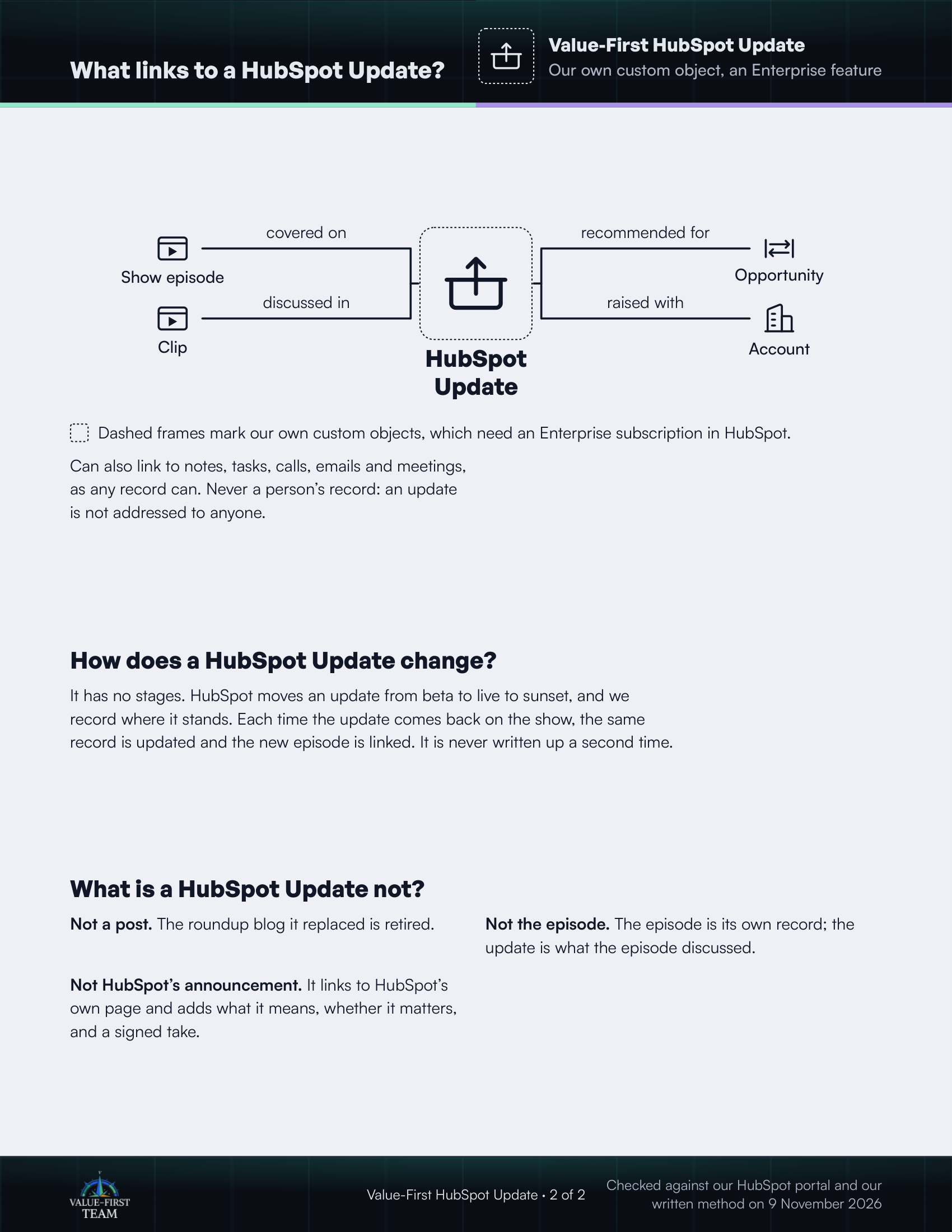
What links to a HubSpot Update?
- covered on Show episode
- discussed in Clip
- recommended for Opportunity
- raised with Account
Dashed frames mark our own custom objects, which need an Enterprise subscription in HubSpot.
On the printed sheet these objects are drawn with dashed frames; this list gives the same links without the frames.
Can also link to notes, tasks, calls, emails and meetings, as any record can. Never a person’s record: an update is not addressed to anyone.
How does a HubSpot Update change?
It has no stages. HubSpot moves an update from beta to live to sunset, and we record where it stands. Each time the update comes back on the show, the same record is updated and the new episode is linked. It is never written up a second time.
What is a HubSpot Update not?
- Not a post. The roundup blog it replaced is retired.
- Not the episode. The episode is its own record; the update is what the episode discussed.
- Not HubSpot’s announcement. It links to HubSpot’s own page and adds what it means, whether it matters, and a signed take.
Checked against our HubSpot portal and our written method on 9 November 2026