
The printed sheet
How the Value-First Team sets up its own HubSpot portal, for HubSpot users.
A Cart holds the items a shopper chose in an online store, before they buy or leave.
HubSpot builds it in for stores that sync with it, such as Shopify. We use it as HubSpot ships it: no cart has ever reached our portal, and we add nothing of our own.
Try it in your portal
- Look before you build. Open your carts and see what a store app has sent. We looked first, found our portal had never held one, and built nothing on it. CRM › Contacts, then Contacts › Carts. All products and plans.
- Use a built-in property. Search an object’s properties before you create one. Our Cart had three that repeated HubSpot’s own. Settings › Properties, choose the object, then search. All products and plans.
- Archive, don’t delete. Archive a property you don’t use; you can restore it for 90 days. Settings › Properties, hover the property, More › Archive. All products and plans.
Whose value does it serve?
Value for the Customer
No one in our portal yet, because it holds nothing. Someone moving toward us is held on an Interest, one of our own records for a relationship we recognize and develop.
What links to a Cart?
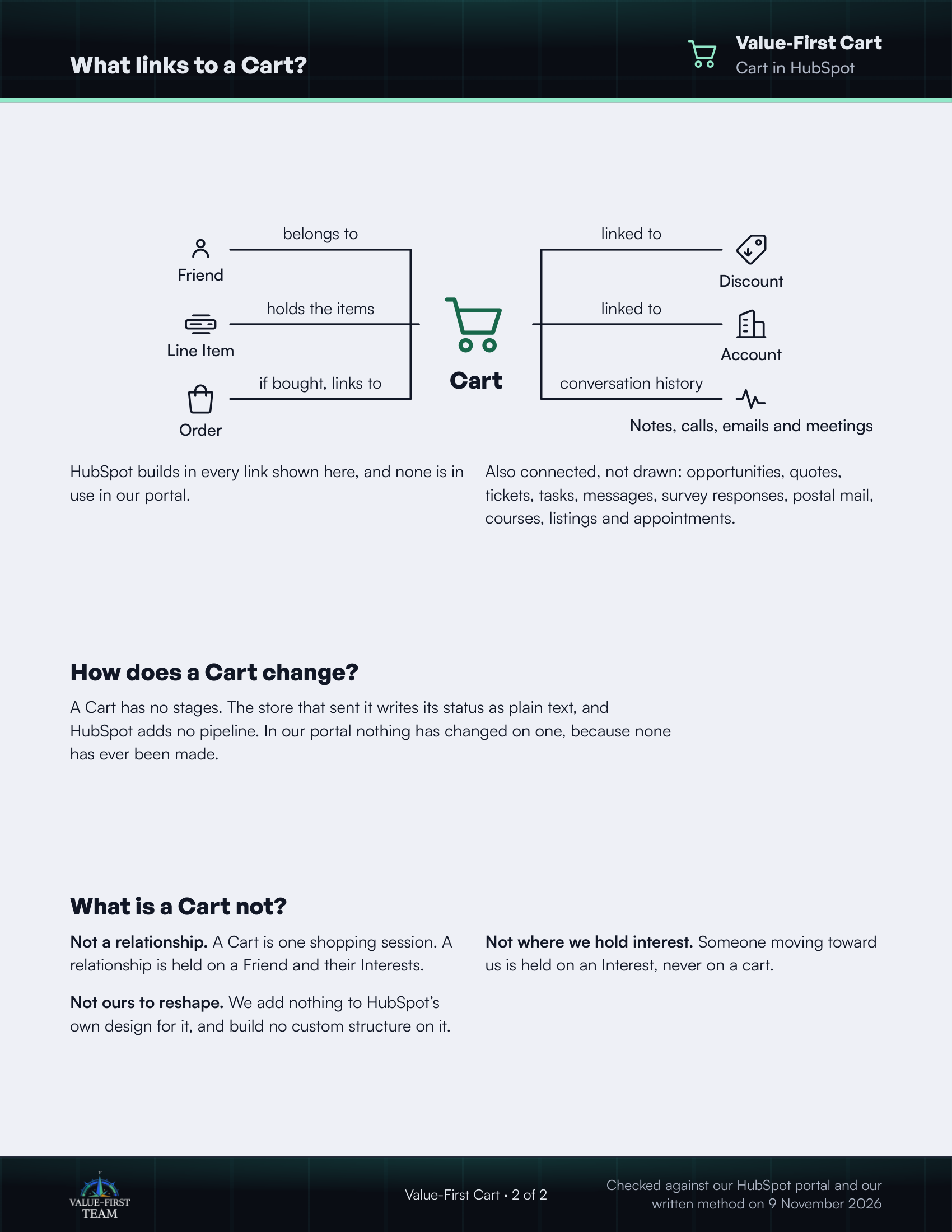
- belongs to Friend
- holds the items Line Item
- if bought, links to Order
- linked to Discount
- linked to Account
- conversation history Notes, calls, emails and meetings
HubSpot builds in every link shown here, and none is in use in our portal.
Also connected, not drawn: opportunities, quotes, tickets, tasks, messages, survey responses, postal mail, courses, listings and appointments.
How does a Cart change?
A Cart has no stages. The store that sent it writes its status as plain text, and HubSpot adds no pipeline. In our portal nothing has changed on one, because none has ever been made.
What is a Cart not?
- Not a relationship. A Cart is one shopping session. A relationship is held on a Friend and their Interests.
- Not where we hold interest. Someone moving toward us is held on an Interest, never on a cart.
- Not ours to reshape. We add nothing to HubSpot’s own design for it, and build no custom structure on it.
Checked against our HubSpot portal and our written method on 9 November 2026